
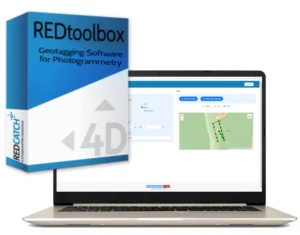
GNSS PPK post-processing & photo geotagging for drone mapping and documentation
REDtoolbox is a Windows application for GNSS PPK post-processing and image geotagging for drones and mapping cameras.
Use it when RTK is unavailable or unreliable: REDtoolbox computes a centimetre-accurate trajectory from RINEX data and writes precise image positions to EXIF and export files for photogrammetry software.
Process single missions or multi-flight /multi-folder projects in one run using the automatic folder crawler!
Latest release: REDtoolbox v3.5 – new devices, improved handling for fast drones, base station NAV downloader, UI/output enhancements.
From €69 net (perpetual license) • Free trial available
What you can do with REDtoolbox
- PPK correct drone/rover GNSS data using base station / CORS / VRS RINEX
- Geotag images by writing precise coordinates back into EXIF and/or exporting TXT
- Process multiple flights in one run (ideal for corridors, multi-battery projects, large sites)
- Merge hourly RINEX files for clean base station inputs
- Apply geoid corrections for improved vertical results
- Shift EXIF coordinates (bulk XYZ offset) to align existing RTK/PPK imagery to your local control
Key features
- Built for real production workflows
- Automatic project folder crawler to find and organize files
- Multi-flight processing across subfolders
- RGB + multispectral workflows supported
- Outputs for common mapping stacks (see next section)
- Optional CLI for automation and integration into pipelines
Use cases
- No mobile coverage / no RTK corrections available
- No base station on-site (use governmental CORS / VRS RINEX where available)
- RTK dropouts (recover accuracy in post)
- Corridor mapping, flight beyond line of sight and multi-battery missions (multi-flight in one run)
- Multispectral surveys (stable camera positions for processing)
- 360° documentation workflows (geotag spherical images)
How it works
- Import drone/camera logs + base data (RINEX / CORS / VRS)
- Run REDtoolbox to automatically PPK-process the flight into a centimetre-accurate trajectory
- Positions of the images are automatically mapped to this trajectory.
- RGB + multispectral workflows supported
- Outputs for common photogrammetry workflows are available.
- Optional CLI for automation and integration into pipelines
Who uses REDtoolbox
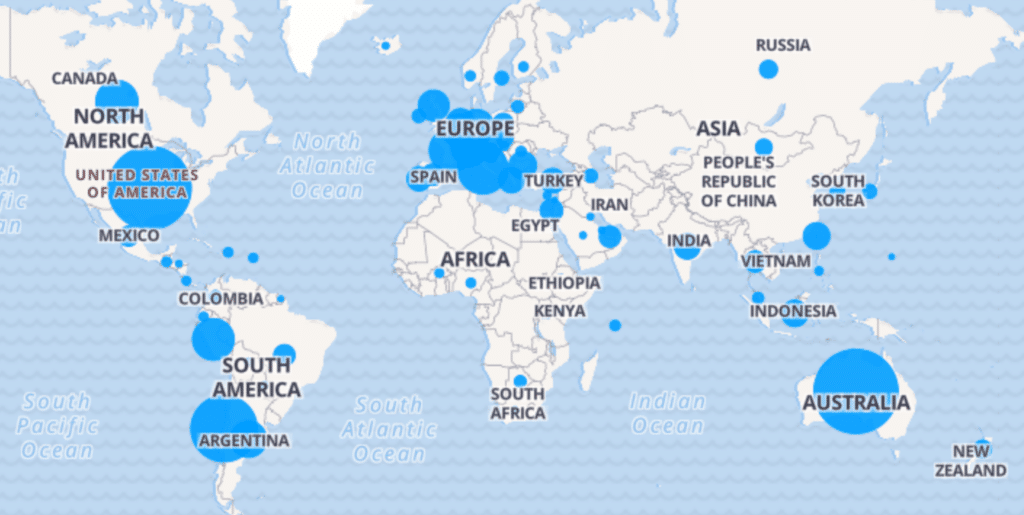
Since 2014, professionals worldwide have used REDtoolbox for surveying, mining, infrastructure, archaeology, and inspection projects — whenever RTK is unavailable, unreliable, or not consistent across multi-flight missions.
REDtoolbox is actively developed, with new device support and workflow improvements driven by real user feedback.
Compatible drones and devices of REDtoolbox software
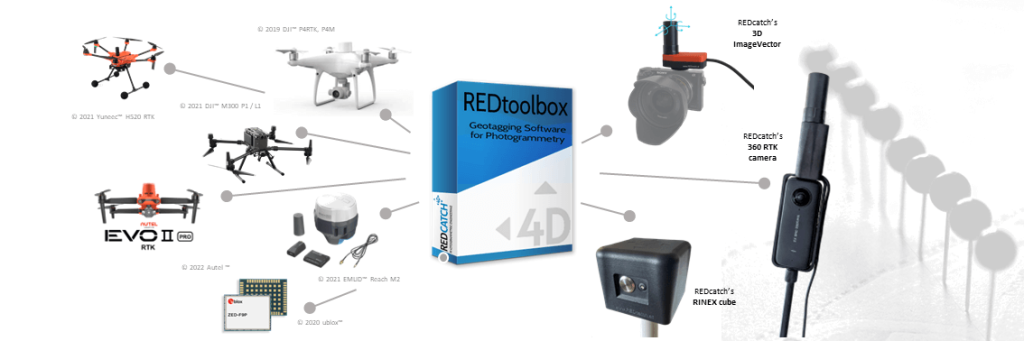
- DJITM Matrice 4 Enterprise, Multispectral RTK
- DJITM MAVIC 3 Enterprise, Multispectral RTK
- DJITM L2/L3 (RGB camera)
- DJITM P4RTK , Zenmuse P1 camera
- SkydioTM X10 RTK drone
- AutelTM EVO2 RTK
- YuneecTM H520, H850 RTK
- EmlidTM Reach kits
- SeptentrioTM mosaik drone kits
- ubloxTM ZED F9P, M8P chips
- ubloxTM kits like: TopoDrone, Teokit, metta, etc
- 3D ImageVector - camera GNSS & IMU
- 360RTK add-on for Insta360 one x4/x5
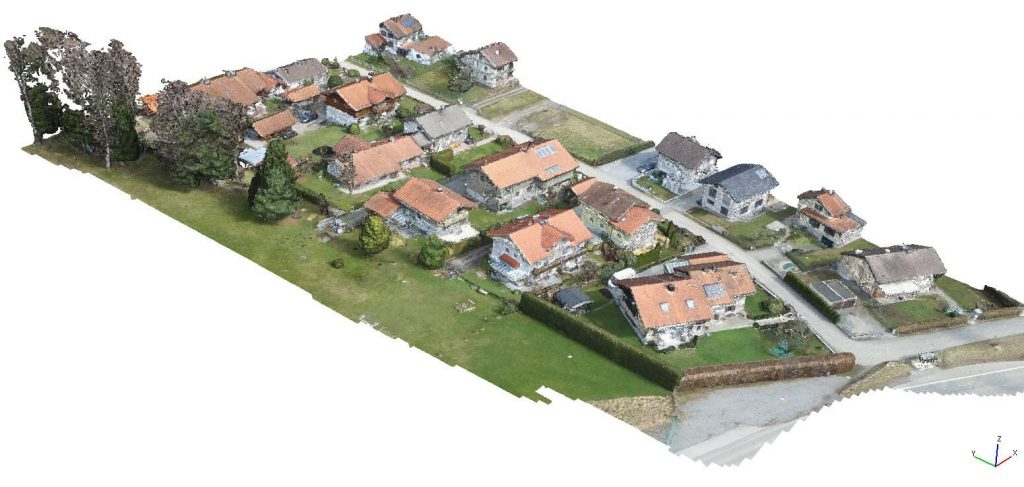
Use the output directly in your photogrammetry software
Use the output directly in your photogrammetry software
Export results as TXT/CSV, write coordinates directly into image EXIF, or create project-ready outputs for common mapping software. No extra conversion steps required.
Ready to use in Agisoft Metashape Professional, Pix4d Mapper, Pix4d Matic, DJI Terra, Shapefile, Google Earth kml export, etc.
- Agisoft Metashape Professional
- Pix4D Mapper / Pix4d Matic
- Reality Capture
- 3D Survey
- DJI Terra
- 3D Zephyr
- Open Drone Mapper (ODM)
- any, able to read txt or EXIF data
(R), TM ….All listed company and product names like DJI, Phantom, Autel, Emlid, Yuneec, ublox, etc. are registered trademarks.
REDtoolbox Tutorials
PPK and Geotagging Highlights
Watch this video, to get an idea how to use REDtoolbox for your daily work and where it can help you
- The automatic folder crawler to automatically select your files
- select your export favourites, such as EXIF, txt, Metashape *.psx, Pix4d *.p4d, PDF Reports, etc
- Run and analyse
Bulk shift (xyz) EXIF lat/lon/elev coordinates
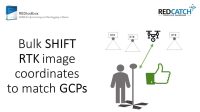
Already have RTK data but you discovered discrepancies compared to your GCPs in lat/lon maybe due to missing NTV2 local transformation? Or in elevation/height due to non accurate geoid information?
REDtoolbox helps you to:
- by shifting lat/lon/elev coordinates, extracted from drones original EXIF images information
- enter the bulk shift in meters
- re-writes this positions into EXIF again so all other data like XYZaccuracy and roll/pitch/yaw remain
Multi flight processing
Learn how to use the “automatic search folder” option to process multiple flights in multiple subfolders in one single run. This will speed up your PPK processing and provide better results
How to use with DJI(c) Terra

We created a video tutorial for the growing users of DJI terra software. As DJI terra does not allow an import of modified EXIF data directly. So please, follow the simple steps and you will enjoy REDtoolbox PPK accuracy in Terra.
Apply GEOID information
Apply *.tif geoid (WGS84 projection!) heights while PPK processing or on already geotagged RTK photos
Merge RINEX files
No matter what version of RINEX files you have. Outdated 2.x or 3.x, Hatanaka compressed or basic RNX, we can all merge them and update them to latest version.
- Merge hourly base station file to a single files for easier handling
- This feature is integrated in the “multiple flight processing” too
Watch the video tutorial to see how easy and powerful the RINEX merge tool of REDtoolbox is.
CLI Command Line Interface
Unlock the full potential of your geospatial data with REDtoolbox’s Command Line Interface (CLI)! Designed for the power user, the CLI opens up automated processing capabilities, allowing you to batch process large datasets with ease. Enjoy the flexibility of integrating REDtoolbox into your existing workflows and the efficiency of running complex operations with simple commands. Whether you’re streamlining data analysis or scaling up your projects, the CLI is your gateway to a more productive and automated geospatial future. Perfect for professionals looking to maximize efficiency and accuracy in their work
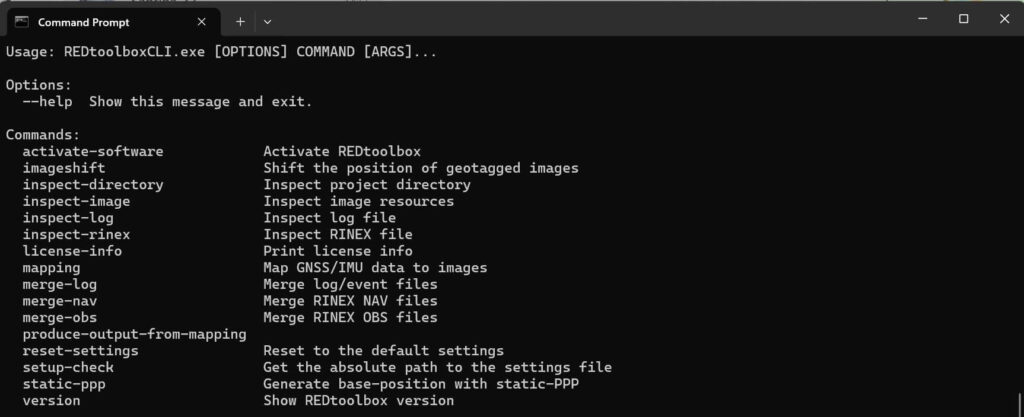
How to use? Navigate to the installation directory of REDtoolbox, enter the ../resources/assets/REDtoolboxCLI/ folder on your PC and start by typing REDtoolboxCLI.exe –help
Our promises
- We help you!
- Providing professional support
- Get the most out of your gps data
Get rid of using many many GCPs
For those looking to fully integrate REDtoolbox into their workflows, we offer personalized online training sessions. Our expert trainers are ready to tailor each session to your specific needs, ensuring you maximize the capabilities of REDtoolbox in your projects. Whether you’re new to aerial surveying or looking to enhance your existing skills, our training provides the insights and guidance necessary to optimize your use of the software. Take advantage of our customized training to unlock the full potential of REDtoolbox in your professional environment.
Download & free trial
Windows x64 software
Submit your email to download REDtoolbox software
Buy REDtoolbox software
Online purchase and product fulfillment are through FastSpring, a trusted online portal.
License only
Euro 69,- /net
- 1 seat perpetual license
- No updates (limited to your current version)
- Unlimited images / no output limitation
License + 1 year updates
Euro 99,- /net
- 1 seat perpetual license
- 1 year of updates included
- Regular email support for handling questions
+ Lifetime updates + Support
Euro 199,- /net
- 1 seat perpetual license
- lifetime updates for free (as long as software exists)
- Priority email/phone support
- 1.5 hours support + data analysis included
For existing customers: Update rates to current version and lifetime update
FAQ
REDtoolbox – Change Log
Do you offer educational discounts?
Yes — 50% off for students and teachers. Please open a support ticket from your verified educational email address to receive a coupon.
Why should I use PPK instead of RTK?
Use PPK when you have weak/no coverage, long missions, or want maximum data integrity. RTK needs a stable correction link; PPK corrects after the flight using reference data.
Do I need my own base station?
Not always. You need reference RINEX data — from CORS/VRS, your own base station, or other GNSS reference sources depending on your region.
Does REDtoolbox use all GNSS systems?
Yes. REDtoolbox supports GPS, GLONASS, BeiDou and Galileo, including multi-band processing (L1/L2/L5).
Is training required?
No. Most users start with tutorials and free basic support. Training is recommended for advanced workflows (multi-flight, GEOID, time offsets, photogrammetry integration).
Does REDtoolbox reproject coordinates?
No. REDtoolbox outputs WGS84 with ellipsoidal heights. GEOIDs are supported for vertical correction; horizontal transformations are not included.
Do I need two base-station files (RINEX .O and NAV)?
- Observation (e.g.,
*.24o): raw satellite measurements - Navigation (e.g.,
*.24p/*.24n): satellite ephemerides
RINEX 3.x NAV files are preferred; older RINEX 2.x may split navigation into multiple files.
Can I merge two or more physical base stations into one virtual base?
No. REDtoolbox cannot create a virtual base station from data recorded at different physical locations for the same time span.
Which devices are supported by REDtoolbox?
REDtoolbox focuses on DJI, Autel, Skydio and REDcatch add-ons. Recent versions include modern drones (e.g., Matrice series) and Skydio X10 PPK workflows.
What is the “Shift EXIF” workflow for?
Shift EXIF applies a consistent XYZ offset to existing RTK/PPK image coordinates — useful when base coordinates are finalized later or you need an adjustment so flights align correctly.
Version 3.5.1 (17.02.2026) — Hotfix
– Hotfix for Exif Shift Workflow
Version 3.5.0 (11.02.2026) — Major Update
– NAV file downloader from IGS server
– Fix solution enhancements for fast flying drones
– Added trigger statistics for drone devices
– Added L3 and M400 device
– Enhanced Metashape output and support multi camera rig
– Enhanced GUI display (statistics, maps)
– Ionosphere correction ppk enhancements
– Added MachineID to license handling
Version 3.4.2 (20.11.2025) — Hotfix
– Fix invalid default PPK setting
Version 3.4.1 (05.11.2025) — fix solution enhancement
– Improve FIX stability for flights >10 m/s and terrain-follow mode
– Add REMOVE_BEIDOU_SATELLITES option for compatibility with faulty RINEX converters
– Adapt base station update rate if higher than 1 Hz
Version 3.4.0 (27.08.2025) — Major Update
– Internal upgrades
– Updated antenna database
– Added an advanced option (USE_MINIMUM_RESOLUTION_SET) to limit processing to GPS+GLONASS, this will help in cases where the navigation file data for other systems is corrupted or not properly encoded
– Added the ability to revoke the license for the currently installed machine
Version 3.3.4 (21.07.2025) — Bugfix
– Fixed an issue related to parsing RINEX files with duplicate observation types
– Fixed an issue with the 360 device where the orientation was swapped
– Fixed an issue with GLONASS and BEIDOU navigation data parsing
– Added an advanced option for disabling BEIDOU ambiguity resolution; if you are having issues with an abundance of float solutions using your Matrice4E then using this setting may significantly improve the fix rate as there is an issue with the BEIDOU signal conversion on the Matrice4E
Version 3.3.3 (16.06.2025) — Bugfix
– Fixed an issue when converting DJI DRTK-3 base files
Version 3.3.2 (10.06.2025) — Hotfix
– Fixed a Beidou message conversion issue related to the Matrice 4E
Version 3.3.1 (02.06.2025) — Hotfix
– Fixed a timing issue related to .RTK files on the Matrice 4 and the L2
– Allow to manually select .OBS files for the Matrice 4
Version 3.3.0 (19.05.2025) — Major Update
– Added support for the DJI Multispectral payloads
– Fixed a conversion issue which can occur with DJI L2 payloads
– Small bug fixes
Version 3.2.0 (28.02.2025) — Major Update
– Added support for the DJI Matrice 4 Drone with RGB payload
– Updated EXIF/XMP handling and loading, in particular remote path issues should occur less often
– Small bug fixes
Version 3.1.93 (24.01.2025) — Bug fix update
– Fixed a regression related to M2 event parsing
Version 3.1.92 (15.01.2025) — Bug fix update
– Fixed an issue with the camera EXIF order in some DSLR
Version 3.1.91 (05.11.2024) — Bug fix update
– Fixed wrong rotation for DJI terra output
– Fixed wrong time scale selection for UBLOX/EMLID
– Fixed Hotshoe RTK time scale issue
Version 3.1.9 (04.10.2024) — Regular update
– Fixed orientation info for DJI drones in text outputs. Orientation is now stable and rotated correctly for the specific output. Note this only affects textfile output, EXIF/XMP information is not modified
– Added timezone and subsec information reading from EXIF/XMP. This will increase accuracy and eliminate a class of mapping issues, in particular the Sphere and RTKcamera device profit from this massively
– Fixed OPK computation. This is a consequence of the fixed text output orientation for DJI and related devices
– Added PPK for the Sphere device
– Added RTKcamera device and PPK workflow for the device
– Fixed a class of issues related to double base headers
– Fixed a rare issue where the antenna pole height is not added correctly when switching back and forth between different locations
– Improved PPK processing speed
– Fixed small visual bugs and smaller internal issues
Version 3.1.8 (01.07.2024) — Regular update
– Added antenna database; if available, REDtoolbox now automatically applies accurate PCV information
– Fixed wrong ARP offset being loaded for some RINEX files in manual mode
– Enhanced manual base station GUI workflow
– Fixed small manual base station GUI issues
– RNX file ending bug fixed
– Fixed issue with 3.1.7 installer for PDF output generation
Version 3.1.7 (27.05.2024) — Regular update
– Fixed mismatch with certain base station configurations
– Updated default ATX file to latest ATX file
– Reworked base station offset GUI
– RNX ending added to file picker
– Removed standalone-PPP; due to inaccuracies we temporarily remove the feature until it is within the range of accuracy we find acceptable
Version 3.1.6 (14.05.2024) — Final 3.1.X Update
– Fixed a crash when merging RINEX files containing more than 16 observation types
– Potential fix for missing metadata updates on images when using Windows 11 with non-latin paths
– Potential fix for error on generating a PDF result with input data originating from an external/network drive
– Upgraded the internal EXIF engine which results in a significant speedup of all image operations
– Fixed a numerical issue when approximating the offset for the 360 camera device
– Optimized the geometrical verifier and minimized verification calls which will reduce the processing time
– Fixed geometrical verifier edge cases which lead to wrong assignments in rare cases
– Added DJI Terra compatible text output format
– Small internal updates and bug fixes
Version 3.1.5 (08.03.2024) — Final feature update for 3.1.X
– Added PPK support for DJI Zenmuse L2 RGB
– Improved the automatic offset estimation algorithm for the REDcatch 360° Sphere Camera Add-on
– Fixed an issue that prevented activation of some licenses after an update
– Fixed an issue where the geometric mapping verification would fail due to the size of the input
– Fixed an issue with the mapping related to the REDcatch 360° Sphere Camera Add-on
– Fixed an issue with the default geoid egm 96 file
– Decoupled some internal files such that multiple instances of the CMD version of the REDtoolbox should be launchable
– Tweaked some default setting values
Version 3.1.4 (12.02.2024) — Large update
– Base station position entry mask is now split in latitude and longitude to make manual entry easier, as the automatic converter made it hard to manually enter coordinates
– Base station UI updated
– Fixed labeling of ARP/APC with certain base manufacturers
– Fixed a rare issue where the image loading process would not continue due to Windows 11 wrongly using the OEM code pages (non‑latin paths)
– Fixed an issue where Windows 11 would use the OEM code pages instead of UTF-8 during PPK processing
– Fixed PDF not mentioning ATX usage and inserted missing REDtoolbox version statement
– PPK: Interpolation now uses modified Akima splines for smoother, more accurate positions (esp. multiflight scenarios)
– PPK: REDtoolbox now automatically adjusts the given base file to the range of the rover span (lower memory/time)
– Mapping: Geometrical verification added to catch most time synchronization issues
– Mapping: Faster, more robust mapping algorithm; many parameters are now configurable via settings
– Multiflight: Automatic clock change detection; handles out-of-span triggers; invalid/out-of-range triggers are dropped
– Internal UI and engine upgrades
Version 3.1.3 (22.01.2024) — Regular update
– Updated obs BEIDOU codes
– Breaking: All output formats are now placed in their own subdirectory to reduce clutter and improve navigation
– Breaking: Triggers outside the observation timespan and invalid triggers are now dropped (with warnings) instead of causing errors
– Fixed an issue where REDtoolbox rejects valid ATX files
– Fixed a mismatch in file ending matching between REDcatch file (000) and textfile (txt)
– Fixed an issue with reading TEQC/RINEX2.11 modified files
– PPK: Reduced certain thresholds when processing merged projects
– PPK: Changed and improved GLONASS processing; rely more on BEIDOU instead of GLONASS (due to DJI firmware changes)
– GUI: Improved intent/graphic of base coordinate location offsets for ARP/APC/Ground
– GUI: Added time spans to base/trigger files and invalid/valid trigger display; warnings when spans mismatch
Version 3.1.2 (13.12.2023) — Regular update
– Fixed incorrect nav file ending matching for nav file types in rx group
– Auto-search: No longer discards non-overlapping base/rover candidates (more aggressive selection)
– Renamed PIX4D output format to PIX4Dmapper
– Fixed a mismatch between PIX4Dmapper expected orientation and DJI drone provided orientation
– RINEX reader: Accept epochs with no epoch flag; zero observations; non-standard body-header formatting in header information epochs
Version 3.1.1 (05.12.2023) — Regular update
– Fixed an issue related to certain GLONASS satellites
– Fixed REDtoolbox not loading/merging certain BEIDOU/GLONASS navigation files
– Correctly handles/merges faulty DJI observation files containing invalid double epoch entries
– Auto-search: RXO files are now always considered only as base files
– Auto-search: Ignore drone-provided nav files to avoid auto-merge failures due to RINEX version differences
Version 3.1.0 (22.09.2023) — Major redesign and automation update
– Eliminated all legacy code remaining from pre‑3.0.0
– Fixed numerous user-reported issues
– Reworked internal text handling; reliable non‑latin script support for files, paths, inputs
– Upgraded internal engine; average speedup ~100%
– Reworked the majority of the GUI for all operations and workflows
– Two-button mapping with auto-import and auto-merge of relevant files (with fallback selection UI)
– Reworked settings; minimal configuration needed
– New, consistent, flexible output engine
– New LaTeX-based PDF report; more informative and polished
– New RINEX backend supporting RINEX 2.X to 4.X; merge/read/process obs and nav files
– Recursive search option for images
– Option to overwrite EXIF/XMP instead of copying (dangerous; shows warning)
– In-app bug/support submission (requires valid license)
– Geoid support (GeoTIFF; bicubic interpolation), also in imageshift workflow
– Save/label Geoid and ATX files loaded into REDtoolbox
– Device support added: Swift Navigation, REDcatch HotshoeRTK, Sphere-camera add-on, Septentrio
– NMEA-GNGST reading (accuracy info) with integration into outputs
– PIX4Dmatic output support (beta)
– Merge tool GUI for triggers (e.g., .mrk, .sbf), RINEX nav and obs into single files
– Automerge when multiple trigger/nav/obs files are selected
– RTK from UBX support for IV/EMLID/UBLOX devices
– Beta/alpha opt-in channels for early access
– Base antenna phase center modifier
– Base position selection: static‑PPP, RINEX-Header, manual input
– Base position input parser: robust to common formats
– PPK: More precise trigger generation; improved leverarm correction; improved position shift
– Extended and refined DJI, YUNEEC, AUTEL, EMLID, UBLOX support
– Reworked auto-update UI; differential updates
Version 3.0.91 (20.04.2023) — Final 3.0.X release
– Support Mavic 3 RTK device
– Hotfix update for EXIF XMP Longitude, Altitude writing
Version 3.0.90 (28.08.2022) — Maintenance mode for 3.0.X
– Bug fixes
– Minor GUI adaptations
Version 3.0.9 (18.05.2022)
– Allow EMLID *22o files (reference GPS time)
– Added CMD version command
– Rearranged settings in GUI
– Minor GUI adaptations
– PPK enhancements, allow low SNR / elevation satellites
– EXIF writing adaptations due to DJI’s misspelled longitude XMP entry
Version 3.0.8 (17.03.2022)
– Hotfix: license key already-in-use check
– Fixed: incorrectly set advanced settings file could fail mapping process
Version 3.0.7 (01.02.2022)
– Hotfix update for internal library issues
– Minor GUI changes
Version 3.0.6 (18.01.2022)
– Hotfix update for internal library issues
Version 3.0.5 (14.01.2022)
– Small UI changes
– Added “remove ATX file” button in base station modify drawer
– Updated values to match GLONASS fix solution requirement
– Fixed switching multiple times between relative/absolute difference in mapping table
– Fixed rover .bin/.dat conversion issue
– Fixed correct image/date reading issue
– Fixed ATX file not being removed with reset input button
– Fixed issue when no ATX file is known but option is still activated
Version 3.0.4 (10.01.2022)
– Added EULA (must be accepted for installation/usage and for each update from this version forward)
– Fixed an issue with setting the manual base coordinates
– Added appropriate trademarking for devices
– Added slider to switch between relative and absolute time difference in the mapping table
– Reworked ATX file reading and feedback; last used ATX file is now remembered (configurable in Settings)
– Fixed wrong quality type counting for RTK corrections
– Removed RTK correction for devices where it wasn’t necessary (simpler input masks)
– Fixed some GUI inconsistencies (e.g., naming for output formats)
– Reworked mapping tool layout for reduced mouse movement
Version 3.0.3 (10.12.2021)
– Split EMLID M2 device selection to resolve timestamp particularities
– Fixed an issue preventing correct trigger number reporting for EMLID devices
– Fixed a precision issue
– Small GUI changes
Version 3.0.2 (01.12.2021)
– Fixed file type validation errors for some types (e.g., .gnav)
– Fixed test licenses not having full functionality for 14 days
– Fixed PDF reporting the wrong number of images
– Fixed an error when moving backwards after a failed mapping
– Fixed issues relating to DJI and YUNEEC SSP corrections
– Less strict GPS EXIF validation (improves compatibility with some smartphones)
– Added filtering step removing triggers with too-small time difference (default: 0.15s; configurable via advanced settings)
– Added button to load a previous project from the device selection screen (older duplicate remains in output screen if needed)
Version 3.0.1 (15.11.2021)
– Hotfix release for various issues
Version 3.0.0 (12.11.2021) — Initial version 3 release
– Completely redesigned, extended and reworked GUI
– New backend for GUI
– New CLI tool with functionality equivalent to the GUI
– Completely reworked image shift workflow
– Installer/Uninstaller added (choose installation location; may require admin rights; licensing persists after uninstall unless requested to be removed)
– Auto-updating available via in-app button (requires internet and correct firewall; availability depends on license eligibility)
– Visual interactive map for mappings, plus reworked table view
– Asynchronous processing (load images and files concurrently)
– Save/load mappings for reuse in new sessions
– Reapply mapping algorithm to already mapped projects with different options
– Direct mapping option (map by ordering)
– Full TIFF and DNG support
– ATX and CRX file support added
– YUNEEC and AUTEL drone support added
– TopodroneKit/Teokit support added
– Image resizing added for all supported formats
– Automatic mode switching for pos generation for large files (configurable)
– Processing options for large .obs files
– Improved support file generation
– Numerous bug fixes and stability improvements
– Fixed base coordinate parsing (case sensitivity and formatting)
– Fixed antenna delta/manual base coordinate application
– Fixed mapping table changes not applied to output
– Fixed various auto-import issues
– Fixed file decompressing issues